 SkinForge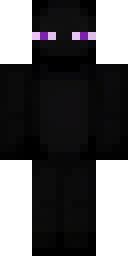
Raw skin file: 64×64 PNG

Abyssal Gaze
Mobs skin by warrior23 · today
A tall, slender black figure with small glowing purple eyes, simple blocky texture, and no visible clothing, just pure Enderman form.
About this skin
Abyssal Gaze is a mobs Minecraft skin published by warrior23 and forged with SkinForge AI from the prompt A tall, slender black figure with small glowing purple eyes, simple blocky texture, and no visible clothing, just pure Enderman form.
. It uses the classic (Steve) player model with 4-pixel arms. Tags: enderman, minecraft mob, ender, purple eyes, tall. Download it free as a 64×64 PNG for Java Edition or as a .mcpack for Bedrock and Pocket Edition, or open it in the SkinForge app to remix the outfit, hair or colors with a sentence.
How to install
Java Edition
- Download the PNG above.
- Open the Minecraft Launcher and go to Skins.
- Choose New skin, browse to the file and pick the Classic model.
- Save. The skin applies to your account on every device.
Bedrock, Pocket Edition, Xbox, PlayStation, Switch
- Download the .mcpack above on a phone or PC.
- Open it; Minecraft launches and imports the pack.
- Go to Dressing Room › Owned and equip Abyssal Gaze.
Trouble? Read why a Minecraft skin doesn't show up and how to fix it.
Make your own version
Open SkinForge, type what you want to change about Abyssal Gaze or describe a new character from scratch. The app forges a full skin in about 20 seconds and exports to Java or Bedrock.
DownloadApp StoreMore mobs skins
All mobs skins →



Questions
How do I use Abyssal Gaze on Minecraft Java Edition?
Click Download for Java to get the PNG. Open the Minecraft Launcher, choose Skins, then New skin, browse to the file and pick Classic as the model.
How do I use it on Bedrock or Pocket Edition?
Click Download for Bedrock to get the .mcpack, then open the file. Minecraft imports it and Abyssal Gaze appears in the Dressing Room under Owned.
Can I change this skin?
Yes. Open it in the SkinForge app and type the change you want, like "make the jacket purple" or "add a cape". The app edits the skin in place and you can export the new version.